
There are following steps for solution of when convert pdf file, The document has insufficient permission for this operation error occurred.
Step-1: First of open your file in "Adobe Acrobat".
Step-2: Click on "File Menu"-> Save As-> Microsoft Word->Word Document

Step-3: When, You will try to convert this types of file below error occurred.

Step-4: How to solve this problem. So, First of all Print this file on "Adobe PDF". Click on File
Menu-> Print

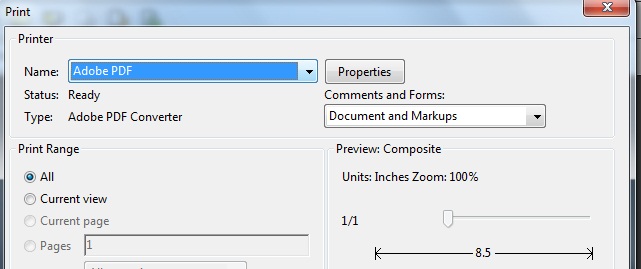
Step-5: Select Name: Adobe PDF and Click on "OK" button.

Step-6: Select your path, When you want to Save it and Click on Save button.

Step-7: Now open your saved file and Click on File Menu-> Save As-> Microsoft Word-> Word
Document.

Step-8: Now, Click on Save button and Enjoy this file.

Note: If You will want to more information, Please mail me on "info@itsolution4u.in"
Step-1: First of open your file in "Adobe Acrobat".
Step-2: Click on "File Menu"-> Save As-> Microsoft Word->Word Document

Step-3: When, You will try to convert this types of file below error occurred.

Step-4: How to solve this problem. So, First of all Print this file on "Adobe PDF". Click on File
Menu-> Print

Step-5: Select Name: Adobe PDF and Click on "OK" button.
Step-6: Select your path, When you want to Save it and Click on Save button.

Step-7: Now open your saved file and Click on File Menu-> Save As-> Microsoft Word-> Word
Document.

Step-8: Now, Click on Save button and Enjoy this file.

Note: If You will want to more information, Please mail me on "info@itsolution4u.in"